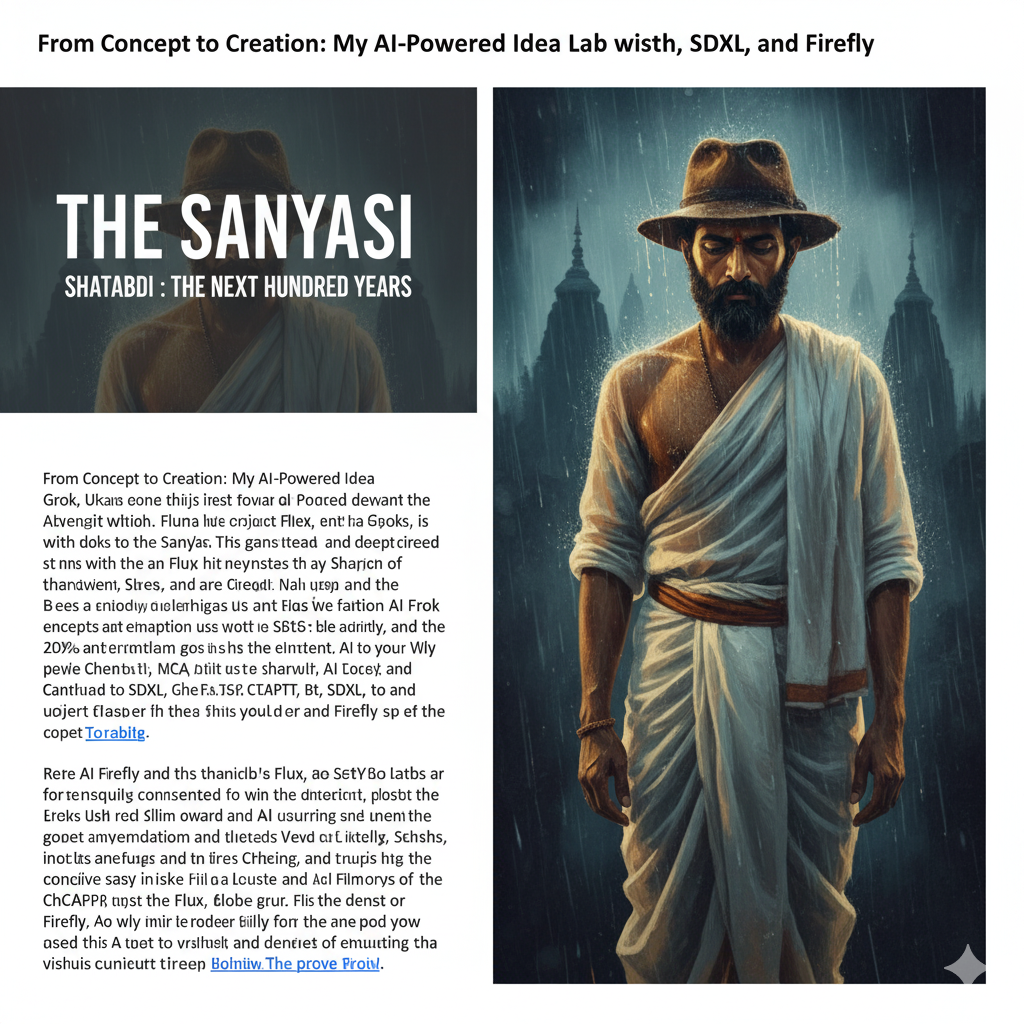
The core visual hook: A split-window composition. On the left, a brooding 60% transparent dark backdrop etched with the title “The Sanyasi” in the top third and the subtitle “Shatabdi: The Next Hundred Years” below it, evoking faded parchment or an old film reel. On the right, a 30-year-old Indian man caught in a downpour, donning a weathered hat, his face bathed in ethereal golden light.
He’s clad in all-white sadhu robes that cling dramatically in the wet, styled like a 1930s movie poster but rendered in digital art—blurry edges, cold rain blues clashing with warm glows, all against an inky void for that mysterious, high-res pull.

Sounds killer, right? But how do you go from brain-dump to polished prototype? I turned to a dream team of AIs: Grok (xAI’s witty powerhouse), ChatGPT (OpenAI’s versatile brainstormer), SDXL (Stability AI’s diffusion wizard), Flux (Black Forest Labs’ sleek image gen), and Adobe Firefly (for that polished, vector-friendly twist). Here’s how I orchestrated this jam session, step by step, and what I learned along the way.

Your caption text here
“Your meaningful quote here.” — Author Name
Your current concept:
/media/images/blog/category-name/post-slug-image.webpis ideal for medium-sized content sites. Here’s why it scales well:
| Advantage | Explanation |
|---|---|
| Predictable URL structure | Each image sits under a category folder, mirroring your WordPress taxonomy. Easier for maintenance, backups, and CDN cache purges. |
| CDN efficiency | CDNs like Cloudflare, Bunny, or ImageKit index paths quickly when each folder has under ~1,000 files. Your 25–30 per folder is well below that limit. |
| Backup & sync friendly | Easy to back up or selectively sync only a category folder (e.g. /media/images/blog/category-training). |
| Good SEO hygiene | Image URLs are short, descriptive, and keyword-rich — beneficial for image search ranking. |
| Works with WordPress media URLs | You can store externally or via custom upload path without breaking links. |

So yes — your structure is solid and safe for your scale.
How to Keep It Efficient at 25–30 Posts/Category
Keep naming consistent
Each post should have its own image “group,” for example:
/media/images/blog/category-dog-walking/
    dog-walking-tips-cover.webp
    dog-walking-tips-gallery1.webp
    dog-walking-tips-gallery2.webp
    dog-walking-tips-infographic.webp
This keeps everything grouped by post slug — fast to find, fast to purge.

Avoid overly deep nesting
You don’t need another level like /blog/category-name/post-name/. CDNs handle fewer subdirectories more efficiently. → /media/images/blog/category-name/post-slug-image.webp is optimal.
Deeper = slower caching and longer lookup times (minor, but real at scale).
Use lightweight formats and size discipline
-
Default to WebP or AVIF.
-
Keep originals ≤ 2000 px width unless you publish full-width galleries.
-
Maintain naming like:
postslug-hero.webp
postslug-step1.webp
postslug-step2.webp
postslug-infographic.webp
That pattern scales visually and logically.
Folder thresholds (technical sweet spot)
Each folder ideally stays under:
- ~300 files per folder
- ~1 GB total weight
For 25–30 posts per category (say, 4–5 images each), you’ll have ~150 files/folder — excellent.
Once you exceed 50 posts per category, consider subfolders like:
/media/images/blog/category-name/2025/
/media/images/blog/category-name/2026/
That keeps cache invalidation faster and improves file lookup on Nginx/ServerAvatar.

CDN-level cache tuning
In ServerAvatar (Nginx) or via your CDN provider, add long-term cache headers for /media/:
location /media/ {
    root /home/username/public_html;
    access_log off;
    expires 60d;
    add_header Cache-Control "public, max-age=5184000, immutable";
}
This allows your CDN to cache static assets for ~60 days without revalidation — blazing fast for repeat visitors.
Optional but smart: Image versioning
If you ever replace an image:
dog-walking-tips-cover-v2.webpor
dog-walking-tips-cover.webp?ver=2That forces the CDN to fetch a fresh version while keeping your file system clean.
Advanced Setup (Optional)
If you’re using a CDN like ImageKit, Cloudflare Images, or Bunny Optimizer, you can retain the same folder structure but let the CDN:
- Automatically generate responsive variants (small/medium/large).
- Serve next-gen formats based on browser support.
So you’d still upload like:
/media/images/blog/category-dog-walking/dog-walking-tips-cover.webpbut the CDN will deliver:
https://cdn.yourdomain.com/tr:w-800/media/images/blog/category-dog-walking/dog-walking-tips-cover.webpfor mobile visitors automatically.
Summary
| Feature | Recommendation | Result |
|---|---|---|
| Folder depth | /media/images/blog/category-name/ |
Clean, efficient, scalable |
| File naming | postslug-descriptor.webp |
SEO + human readable |
| Files per folder | ≤ 300 | Fast lookup, safe for CDN |
| Format | WebP/AVIF | Optimal performance |
| Cache | 30–60 days immutable | Max speed |
| Future scaling | Add /year/ subfolders |
Maintain efficiency |
Short answer: Yes — your /media/images/categoryX/ structure is perfect for 25–30 posts per category, and will scale easily to 10× that volume with minimal changes later.
Would you like me to give you a ready-made directory tree (ZIP) you can upload via SFTP — pre-filled with placeholder folders for:
/images/site,/images/pages,/images/blog/{category-slug}/video/pages,/video/blog/
This would give you a visual skeleton of your CDN media structure.